
Hey there! Are you ready to Supercharge Your Website with WordPress? Well, I’ve got some fantastic news for you! There are special add-ons called “plugins” that can make your website even more amazing. In 2023, there are some must-have WordPress plugins that can help you do cool things like adding beautiful photo galleries, boosting your website’s speed, and making it easy for people to share your content. Also, Ai in WordPress presents a compelling opportunity for website owners, developers, and users alike. Let’s explore the best plugins that can make your website shine like a star!
The most useful plugins that you can use right now:
- Elementor
- Yoast SEO
- WooCommerce
- Weglot
- bbPress
- WPForms
- Mailchimp
- LiteSpeed Cache
- Wordfence
- Akismet
- Final thoughts
Why these plugins are necessary? Let’s grab some idea!
Elementor
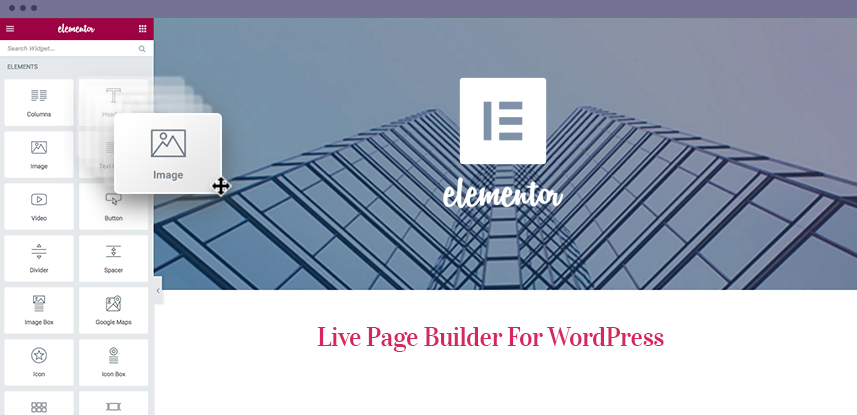
Have you ever wanted to create a super cool website without any help? Well, guess what? There’s a magical tool called Elementor that makes it super easy and fun to design your very own website. It is a super fun and easy-to-use plugin that lets you design your own website like a pro.
Elementor is like a special plugin that you can use to build your website. It’s a plugin for WordPress that lets you create and design web pages in a super easy and fun way. You can choose different elements like text, pictures, and buttons, and move them around just like playing with building blocks. With Elementor, you don’t need to know any special coding stuff, so it’s perfect for anyone.
One of the coolest things about Elementor is that you can design your website by dragging and dropping things. Imagine having a box of colorful blocks, and you can just pick them up and place them wherever you want on your website. You can add pictures, write cool messages, and even create buttons that people can click on. It’s like being a master builder of your very own web world!
Downloads: 5+ million
Rating: 4.5/5
Notable features: drag-and-drop editor, templates library, 90+ free widgets
Best suited for: page building and customization
Price: freemium (from $49/year).
Elementor plugin for WordPress offers
- Drag-and-drop website design
- Beautiful pre-designed templates
- Customizable elements for text, images, buttons, and more
- No coding skills required
- Responsive and mobile-friendly design
- Integration with popular WordPress themes and plugins
- Advanced styling options for creative freedom
- Easy revision and undo/redo functionality
- Seamless integration with WooCommerce for building online stores
- Fast and optimized performance for speedy websites
- Regular updates and new features for continuous improvement.
Is Elementor worth it?
Elementor is totally worth it because it makes your website look awesome! It’s like having superpowers to create beautiful pages and make things exactly the way you want. You can add fun pictures, make things move, and even write cool words on your website. Elementor is easy to use, so you don’t need to ask Mom or Dad for help all the time. You can be a web design superhero all on your own! Moreover, the Elementor Team is doing smart work to make exclusive improvements day-by-day. Currently Elementor is having 3.14 Beta version with a lot of improvement.
With Elementor, you can create all sorts of fun things on your website. You can make colorful buttons for people to click, add cool videos that play on your page, and even make your website look different on phones and tablets. Elementor has lots of special features that let you be really creative. You can change the colors, move things around, and make your website stand out from the crowd. It’s like having a big canvas where you can paint your own masterpiece!
Pros
- User-Friendly: Elementor offers a drag-and-drop interface, making it easy for beginners to design and customize their websites without coding knowledge.
- Powerful Design Capabilities: With Elementor, you can create visually stunning and highly customizable layouts for your website, including headers, footers, and various page sections.
- Template Library: Elementor provides a vast collection of pre-designed templates that you can use as a starting point for your website, saving you time and effort. Click here if you want to know how to use Elementor Template Library.
- Responsive Design: Elementor ensures that your website looks great on different devices and screen sizes, allowing you to create responsive designs effortlessly.
- Extensive Widget Library: The plugin offers a wide range of widgets and elements, enabling you to add functionality to your website, such as forms, galleries, sliders, and more.
- Active Community and Support: Elementor has a large and active community, which means you can find help, tutorials, and resources easily. Plus, it’s frequently updated and supported by its developers.
Cons
- Learning Curve: While Elementor is beginner-friendly, mastering all its features and capabilities may require some time and learning.
- Plugin Bloat: Due to its extensive features and functionality, Elementor can contribute to a larger file size and potentially impact website loading speed if not optimized properly.
- Dependency on the Plugin: If you heavily rely on Elementor for your website design, switching to a different page builder or theme may require some adjustments and could affect the overall layout and design.
Yoast SEO
Yoast SEO is like a helpful friend that makes sure your website is doing great on the internet. It’s a special tool that helps you make your website show up when people search for things on the internet. Just like when you want to find a specific toy or book, people use a special box called a search engine. Yoast SEO helps you tell that box what your website is about so that it can find you easily.
Yoast SEO also gives you tips and suggestions on how to make your website better, like using the right words and making sure your website is easy to read. It’s like having a smart assistant that guides you to make your website super awesome and get lots of visitors.
Downloads: 5+ million
Rating: 5/5
Notable features: SEO analysis, Readability analysis, Innovative Schema block, Focus Keyword Optimization
Best suited for: Website SEO optimization
Price: freemium (from $99/year).
Yoast SEO for WordPress offers
- Page analysis and suggestions for optimizing SEO
- Customization of SEO title and meta description for each page or post
- Automatic generation of XML sitemaps for improved crawling and indexing by search engines
- Readability analysis with suggestions to enhance the readability of content
- Focus keyword optimization guidance
- Setting of canonical URLs to prevent duplicate content issues
- Integration with social media platforms for customized sharing appearances
Is Yoast SEO Worth it?
Yoast SEO plugin does lots of amazing things to make websites super cool! It helps you choose the best words for your website, so people can easily find it. It also helps you write nice and clear sentences. It even checks if your website is easy to read and understand. Isn’t that awesome? With Yoast SEO, your website can become really popular and more people will visit and love it!
If you want more people to find your website and think it’s the best, then Yoast SEO is definitely worth it! It can help your website become more popular and successful. But remember, having great content and being kind to others online is important too. Yoast SEO is just a helpful tool to make your website shine even more!
Pros
- Easy to use: Yoast SEO offers a user-friendly interface that makes it simple to optimize your website for search engines.
- On-page optimization: The plugin provides comprehensive on-page optimization features, including meta tags, XML sitemaps, and keyword optimization.
- Content analysis: Yoast SEO analyses your content and provides suggestions to improve readability, keyword usage, and overall, SEO performance.
- Page preview: It offers a preview of how your page will appear in search engine results, helping you optimize your meta descriptions and titles.
- Social media integration: Yoast SEO includes social media integration, making it easier to optimize your content for sharing on platforms like Facebook and Twitter.
Cons
- Overwhelming for beginners: The extensive features of Yoast SEO can be overwhelming for beginners who are new to SEO and WordPress.
- Frequent updates: Some users find the frequent updates of the plugin disruptive, as it requires regular maintenance and adjustments to settings.
- Limited functionality in the free version: While the free version of Yoast SEO provides valuable features, some advanced functionalities, such as internal linking suggestions, are available only in the premium version.
- Potential conflicts with other plugins: In rare cases, conflicts may occur between Yoast SEO and other plugins, resulting in compatibility issues or performance slowdowns.
- Performance impact: Yoast SEO is a feature-rich plugin that may slightly impact the performance of your website, particularly on slower hosting environments.
WooCommerce

WooCommerce is like a magic machine that helps you set up and run your own online store on your very own website. It’s like having a big box where you can showcase all the toys, candies, and other cool things you want to sell. WooCommerce helps you keep track of everything, like how many tools you have left, how much money you’ve made, and even helps you take orders from people who want to buy your stuff. It’s really easy to use! You can make your store look super colorful and pretty, just the way you like it. With WooCommerce, you can share your amazing products with people from all over the world.
When someone wants to buy something from your website, they can add it to their virtual shopping cart, just like when you go shopping with your parents. Then, they can pay for the things they want and choose how they want them to be delivered. You can even make your store look pretty by adding different colors and designs.
Downloads: 5+ million
Rating: 4.5/5
Notable features: Integrated WooCommerce dashboard, quick setup wizard, support to multiple payment gateways
Best suited for: creating an eCommerce website
Price: free, with optional add-ons starting from $6/month.
WooCommerce Plugin Offers
- Easy setup and installation for selling products onlin
- Seamless integration with WordPress, making it user-friendly
- Customizable and flexible to meet your unique business needs
- Extensive range of payment gateways for secure transactions
- Robust inventory management and product variations
- Advanced shipping options with real-time calculations
- Built-in marketing and promotional tools to boost sales
- Mobile-friendly design for a smooth shopping experience on any device
- Extensive plugin and extension ecosystem for enhanced functionality
- Detailed reporting and analytics for tracking sales and performance
Is WooCommerce worth it?
The worthiness of WooCommerce depends on your specific needs and goals. If you intend to set up an e-commerce store or sell products online, WooCommerce can be a valuable tool. It provides a user-friendly interface, extensive customization options, and a large ecosystem of extensions and themes. Additionally, it integrates well with various payment gateways, making it convenient for customers to make purchases.
However, if you don’t have any plans to sell products online or require e-commerce functionalities, WooCommerce might not be necessary for your website. It’s important to assess your requirements and consider whether the features offered by WooCommerce align with your business objectives.
Pros
- Easy Shop Setup: WooCommerce helps you create your very own online store with just a few clicks!
- Lots of Features: It gives you cool things like product listings, shopping carts, and even a way to accept payments from customers.
- Customization: You can make your store look super cool by choosing different themes and colors.
- Big Community: There are many people who use WooCommerce, so you can get help and share ideas with them.
- Selling Worldwide: With WooCommerce, you can sell your things to people all around the world.
Cons
- Learning Curve: Sometimes, using WooCommerce might be a little tricky, and you may need some help from experts to understand it better.
- Extra Work: Running an online store means you need to take care of things like managing inventory, shipping, and handling customer inquiries.
- Updates: Sometimes, when you update WooCommerce or other plugins, things might not work as they should, so it’s important to be patient and fix any issues that come up.
Weglot

The Weglot plugin is a translation tool for your website. It helps you make your website talk in different languages, just like how you can talk in English, French, or Spanish! When you use the Weglot plugin, it takes your website’s words and changes them into other languages, so people from all around the world can understand what you’re saying.
Let’s imagine your website has a button that says “Hello.” With Weglot, when someone from France visits your website, the button will say “Bonjour.” And when someone from Spain visits, it will say “Hola.” It’s like having a special translator for your website!
This way, more people can visit your website and understand what you’re saying, no matter what language they speak. Isn’t that amazing? Weglot makes your website friendly for everyone, no matter where they come from or what language they speak.
Downloads: 50,000+
Rating: 5/5
Notable features: Multilingual SEO, auto-redirection, glossary
Best suited for: translating a WordPress site automatically
Price: premium (from $15/month)
Weglot for WordPress Offers
- Easy multilingual website
- Automatic & SEO friendly translation
- Manual translation editor
- Language Switcher for visitors
- Customizable language button
- Translation Management for different pages and posts
- Translation Proxy for faster loading times
- Seamless work with popular WordPress themes and plugins
- Dedicated expert support from the Weglot team
Is Weglot worth it?
The benefits of using Weglot include expanding your website’s reach to a global audience, improving user experience for non-native speakers, and potentially increasing international traffic and conversions. Weglot also offers automatic translation, language detection, and SEO-friendly translations.
However, it’s important to consider some factors before deciding if Weglot is worth it for you. The plugin is not free, and the cost varies depending on your website’s size and the number of languages you want to translate. Additionally, while automatic translation can save time, it may not always provide the same level of accuracy as manual translations.
Pros
- Easy Translation: Weglot helps translate your website into different languages, making it easier for people from different countries to understand your content.
- Quick Setup: It’s really easy to install and set up the Weglot plugin on your WordPress website, so you can start translating right away.
- Customizable Language Switcher: You can choose how you want the language switcher to look on your website, making it fun and easy for visitors to switch between languages.
- Live Preview: You can see how your website looks in different languages right away.
- Customer Support: If you need help, Weglot has friendly people who can assist you.
Cons
- Monthly Cost: Using Weglot plugin may have a monthly cost, which means you have to pay some money to use it.
- Limited Free Plan: The free plan of Weglot plugin has some limitations, so you may need to upgrade to a paid plan for more features.
- Translation Accuracy: Sometimes, the translations done by the Weglot plugin may not be 100% accurate, so it’s important to double-check the translations to ensure they make sense.
bbPress
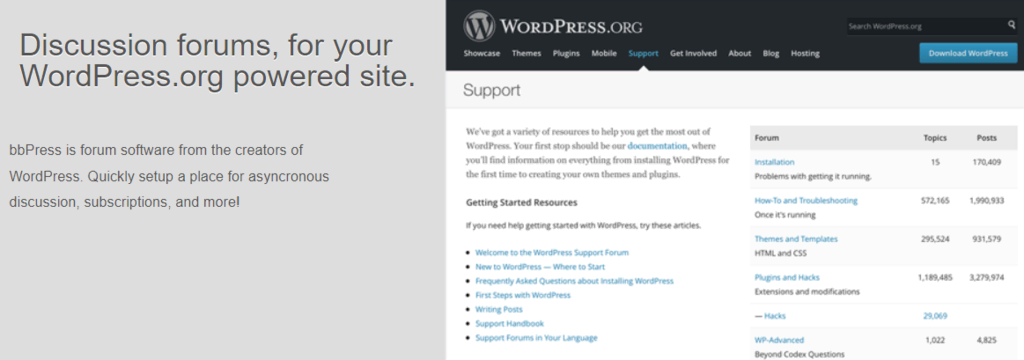
The bbPress plugin is a tool that makes it easy for people to have conversations on a WordPress website, just like talking with friends or classmates. Imagine you have a cool website where you want to talk about your favorite toys or games. The bbPress plugin helps you create a special place on your website where other people can come and share their thoughts too. It’s like having a big playroom where everyone can chat and have fun together!
With bbPress, you can make different sections or topics for your conversations. For example, you could have a topic about superheroes and another topic about animals. People can visit your website and leave messages in each topic, just like leaving notes or drawings on a bulletin board.
The best part is that you can manage the conversations and keep everything safe. You can choose who can join the conversations and even become a moderator, like a friendly admin who makes sure everyone is being kind and respectful. So, with bbPress, you can create a fun and interactive space on your website where people can share their ideas and have a great time talking about things they love.
Downloads: 200,000+
Rating: 4/5
Notable features: simple interface, theme compatibility
Best suited for: adding a forum page to a WordPress site
Price: free
bbPress for WordPress offers
- User-friendly forum creation and management
- Seamless integration with WordPress for a cohesive experience
- Customizable discussion boards and forum layouts
- Robust moderation tools for managing user contributions
- Support for user profiles, private messaging, and notifications
- Flexible permission settings to control user access
- Extensive plugin and theme compatibility for added functionality
- Responsive design for optimal viewing on all devices
- SEO-friendly URLs and content indexing
- Active community and developer support for troubleshooting and updates
Is bbPress worth it?
Imagine having a place where you can talk to other people and ask questions about things you like! With bbPress, you can do just that. It makes it easy for all to set up a forum where people can have conversations and share ideas. You can talk about your favorite games, books, or anything you want! It’s a fun way to connect with others who have similar interests.
The bbPress plugin has some cool features. It lets you create different sections in your forum, like different rooms where you can talk about different things. It also allows you to reply to other people’s messages and start new topics. Plus, it’s easy to use, so even if you’re just starting to learn about websites, you can still join in on the fun. Just remember to be kind and respectful to others when using the bbPress plugin, because that’s how we make friends and have a great time together!
Pros
- Make a Forum: With bbPress, you can create a special place on your website where people can talk and share their ideas. It’s like having a cool clubhouse for everyone to join!
- Easy to Use: bbPress is designed to be simple, so you don’t need to be an expert to use it. It’s like playing with your favorite toys!
- Customization: You can change how your forum looks and make it match your website or favorite colors. It’s like decorating your own room!
- Help and Support: If you have any questions or problems, bbPress has nice helpers who can assist you and make sure everything works smoothly.
- Free to Use: The bbPress plugin doesn’t cost any money, so you can enjoy all its features without spending any of your allowance!
Cons
- Limited Features: While bbPress is great for simple forums, it might not have all the fancy features of more advanced forum tools.
- Requires WordPress: To use bbPress, you need to have a WordPress website. If you don’t have one, you might need to set it up.
WPForms
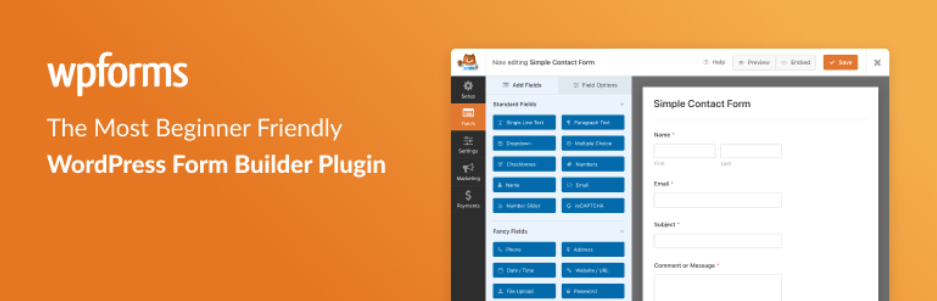
WPForms is a WordPress plugin that helps you create awesome forms on your website. What are forms, you ask? Well, forms are like questionnaires or worksheets where people can write things and send them to you. With WPForms, you can make all kinds of forms, like contact forms where people can send you messages, or even survey forms to ask people their opinions. It’s like having a magic paper that lets you collect information from others!
The best part is that WPForms is really easy to use. You can drag and drop different fields, like name, email, or even smiley faces, to create your form. You don’t have to worry about being a computer genius. And guess what? WPForms looks super pretty too! You can choose different colors and styles to make your forms look just the way you want.
Downloads: 5+ million
Rating: 5/5
Notable features: drag-and-drop builder, pre-made form templates, spam protection, shortcode embedding
Best suited for: creating various forms, including contact, feedback, and subscription forms
Price: freemium (from $49.50/year)
WPForm plugin for WordPress offers
- Easy Form Building without any coding knowledge
- User-Friendly Interface for making it easy for anyone to use
- Drag-and-Drop Functionality like fields and buttons
- Pre-built Templates to save time and effort
- Conditional Logic based on user inputs
- Mobile-Responsive Forms
- Spam Protection to prevent spam submissions
- Email Notifications when someone submits a form on the website
- Payment Integration through popular payment gateways like PayPal and Stripe
- View, manage, and export form submissions from a user-friendly dashboard
Is WPForms worth it?
WPForms is designed to be easy for everyone. It’s like playing with building blocks. You can choose different colors and shapes for your forms and put them together just the way you like. It’s a fun way to interact with your visitors and make your website more awesome!
Even though WPForms is super fun to use, there are a few things to consider. First, WPForms is not free. It costs some money to use all the features. Second, if you only need a simple form, you might not need all the fancy features WPForms offers. There are other free plugins that can do basic forms too. So, it’s important to think about what you really need for your website. It’s always a good idea to ask a specialist for advice and do some more research before deciding if WPForms is worth it for you.
Pros
- Easy Form Creation: With WPForms, you can create different kinds of forms, like contact forms or surveys, without needing to know any complicated coding. It’s like making your own fun questionnaires!
- Drag-and-Drop Builder: You can simply drag and drop elements like text fields and buttons to design your form. It’s like playing with building blocks!
- Beautiful Templates: WPForms offers pre-designed templates that make your forms look nice and professional. It’s like using colorful stickers to make things look pretty!
- Mobile-Friendly: The forms you create with WPForms will work well on phones and tablets, so people can fill them out from anywhere. It’s like having a toy that works wherever you go!
- Helpful Support: If you have any questions or need help, WPForms has a friendly support team that can assist you. They’re like having a helpful friend who knows all about forms!
Cons
- Complexity for New Users: WPForms can have a lot of options and settings, which might make it a bit challenging for new users to understand and use effectively.
- Pricing: While WPForms has a free version with limited features, some of the more advanced features and functionalities require a paid subscription. This means you may need to spend some money to access all the features you want.
- Learning Curve: Since WPForms offers various customization options, it may take some time and practice to become familiar with all the features and how to make the most of them.
- Resource Usage: Using WPForms, especially with a lot of form submissions or complex forms, can sometimes put a bit of strain on your website’s resources, potentially affecting its performance. It’s good to be mindful of this and optimize your forms accordingly.
Mailchimp

Mailchimp is a powerful tool that helps you send emails to lots of people all at once. It’s like having a magical mailbox that can send messages to many friends at the same time. With the Mailchimp plugin for WordPress, you can connect your website to this magical mailbox. It makes it easy for you to collect the email addresses of your website visitors and stay in touch with them by sending them cool updates or important information.
The Mailchimp plugin is super easy to use. You can set it up easily, and it’s easy to how to create beautiful and colorful email templates. You can add pictures, write fun messages, and even send birthday wishes to your friends. Mailchimp also helps you keep track of who opens your emails and who clicks on the links inside. It’s like having a special superpower to see who likes your messages the most!
While Mailchimp is really cool, there are a few things to keep in mind. Sometimes, Mailchimp might ask you to pay some money if you want to send emails to a lot of people. Also, some people might not want to receive your emails, so it’s important to ask for permission before adding them to your mailing list.
Downloads: 2+ million
Rating: 5/5
Notable features: intuitive form builder, pre-made field options
Best suited for: creating newsletter subscription forms
Price: freemium (from €79/year)
Mailchimp plugin for WordPress offers
- Seamless Email Marketing Integration.
- Easy Subscription Form Creation.
- Automated Email Campaigns.
- Audience Management and Segmentation.
- Advanced Analytics and Reporting.
- Customizable Signup Forms and Pop-ups.
- E-commerce Integration for Online Stores.
- Personalized Email Content.
- GDPR Compliance and Data Protection.
- Mobile-friendly Email Templates.
Is Mailchimp worth it?
is the Mailchimp plugin worth it? Well, it depends on what you need. If you have a lot of people visiting your website and want to keep them updated and engaged, Mailchimp can be really helpful. It makes sending emails to a big group of people much easier. However, if you don’t have many visitors or don’t need to send lots of emails, you might not need Mailchimp right now. It’s always good to talk to someone who knows about websites to help you decide if Mailchimp is the right choice for you.
Remember, Mailchimp is like a special mailbox for sending emails, and it can be a useful tool if you want to stay connected with lots of people. But it’s always important to ask for help and decide if it’s worth it based on your specific needs!
Pros
- Easy Email Marketing: Mailchimp helps you send emails to lots of people at once, like when you want to invite them to a party or share something important. It’s like having a special magic spell to reach all your friends in one go!
- Professional-Looking Emails: With Mailchimp, you can create beautiful and stylish emails that look like they were made by a grown-up. It’s like making your own fancy greeting cards!
- Build Email Lists: Mailchimp helps you collect email addresses from people who want to hear from you. It’s like having a special notebook to keep all your friends’ email addresses safe and organized!
- Automation: You can set up Mailchimp to send emails automatically, like a helpful robot. It’s like having a personal assistant who sends messages for you while you’re busy playing!
- Analytics: Mailchimp shows you how many people open your emails and click on the links inside. It’s like having a special telescope to see if your friends like what you sent them!
Cons
- Learning Curve: The Mailchimp plugin can have a bit of a learning curve, especially for new users who are new to email marketing and automation. It might take some time and effort to understand all the features and how to use them effectively.
- Pricing: While Mailchimp offers a free plan with limited features, some advanced functionalities and larger subscriber lists may require a paid subscription. This means you may need to spend money to access all the features you want.
- Limited Template Customization: While Mailchimp provides pre-designed email templates, customizing them extensively might be challenging. You may have limited control over the layout and design elements of your emails.
- Potential Email Deliverability Issues: Mailchimp’s deliverability rates might not always be perfect, meaning that some of your emails could end up in spam folders instead of reaching your subscribers’ primary inboxes. This could affect the effectiveness of your email campaigns.
LiteSpeed Cache
Did you know that there’s a special tool called the Litespeed Cache plugin that can make your WordPress website faster? It’s like giving your website a boost of super speed! When your website is fast, it loads quickly, and people don’t have to wait long to see all the cool things you have on it.
The Litespeed Cache plugin works by storing parts of your website in a special place called cache. It’s like having a secret hiding spot where you keep things to use later. When someone visits your website, instead of building everything from scratches every time, the plugin shows them the already prepared parts. It’s like serving them a pre-made plate of cookies instead of baking them from scratch each time.
By using the plugin, your website can save a lot of time and effort. It’s like having a magical shortcut that makes everything faster and easier. People love fast websites because they don’t like waiting, so it can make them really happy to visit your site.
Downloads: 4+ Million
Rating: 5/5
Notable features: comprehensive cache settings, CDN service, page and image optimization
Best suited for: enabling cache and website optimization
Price: free
LiteSpeed Cache plugin for WordPress offers
- Faster website loading times.
- Caching of website content for quicker access.
- Optimization of images for improved performance.
- Support for browser caching.
- Minification of CSS and JavaScript files to reduce file size.
- Advanced cache management options.
- Compatibility with popular WordPress themes and plugins.
- Integration with content delivery networks (CDNs) for faster content delivery.
- Mobile device optimization.
- Database optimization for improved efficiency.
Is LiteSpeed Cache worth it?
Having a fast website is great because people like things that happen quickly. When your website is fast, people can see all the cool pictures, read your fun stories, and play games without any delays. They can have a great time exploring your website without getting bored or frustrated. But remember, using the LiteSpeed Cache plugin might not be necessary for everyone. If you have a small website or not many people visit it, you might not need the extra speed boost. It’s like if you have a small toy collection, you don’t need a big toy box to store them. But if you have a lot of toys and many friends who come to play, then having a big toy box can be really helpful.
So, whether the LiteSpeed Cache plugin is worth it depends on how big your website is and how many people visit it. If you have a big website with lots of visitors, it can be a great tool to make everything faster. But if your website is small and not many people visit it yet, you might not need it just yet. It’s always good to ask a grown-up or someone who knows about websites to help you decide if it’s right for you.
Pros
- Faster Website: The LiteSpeed Cache plugin can significantly speed up your WordPress website, making it load quickly for visitors.
- Improved User Experience: With a faster website, visitors can navigate through your pages, read content, and interact with your website without any delays. It creates a smooth and enjoyable browsing experience.
- Better Search Engine Optimization (SEO): Search engines like Google consider website speed as an important factor in ranking. By using the LiteSpeed Cache plugin to optimize your website’s performance, you increase the chances of getting better search engine rankings.
- Reduced Server Load: The LiteSpeed Cache plugin can decrease the load on your web server by serving cached versions of your website’s pages.
- Mobile-Friendly Optimization: The LiteSpeed Cache plugin is designed to work well with mobile devices, ensuring that your website loads quickly and looks great on smartphones and tablets.
- Easier Content Updates: With the LiteSpeed Cache plugin, you can easily clear or refresh the cache when you make updates to your website. It ensures that visitors see the latest version of your content without any confusion.
Cons
- Compatibility: The LiteSpeed Cache plugin may not be compatible with all hosting environments or server configurations. Some web hosting providers may not support the LiteSpeed server technology required for the plugin to work effectively.
- Learning Curve: Configuring and optimizing the LiteSpeed Cache plugin might require some technical knowledge and understanding. You may need assistance from someone familiar with WordPress or caching plugins to properly set it up.
- Limited Free Features: While the LiteSpeed Cache plugin offers a free version with basic caching functionalities, some advanced features and optimizations require a paid license. If you want to access all the premium features, you might need to upgrade to a paid version, which can involve additional costs.
- Plugin Conflicts: In some cases, the LiteSpeed Cache plugin may conflict with other plugins installed on your WordPress website. This can cause compatibility issues or unexpected behavior, affecting the overall performance of your site
- Server Requirements: The LiteSpeed Cache plugin relies on specific server requirements, such as the LiteSpeed web server or OpenLiteSpeed. If your hosting environment doesn’t meet these requirements, you may not be able to use the plugin or fully benefit from its features.
Wordfence

The Wordfence plugin is like a superhero that protects your WordPress website from bad guys. It’s like having a shield and a powerful weapon to keep your website safe. Wordfence keeps an eye on your website all the time to make sure no hackers try to break in. It’s like having a security guard who watches over your house day and night. It looks out for things like hackers and malware, which are like sneaky thieves trying to steal important information from your website.
Wordfence protect your website from bad guys, but it also helps you find and fix any problems. It’s like having a detective who looks for clues and solves mysteries. If something looks suspicious or not right, it alerts you so you can take action and make your website even stronger.
Downloads: 4+ million
Rating: 4.5/5
Notable features: two-factor authentication (2FA), web application firewall (WAF), security scan, broken link checker
Best suited for: securing WordPress websites
Price: freemium (from $119/year per license)
Wordfence plugin for WordPress offers
- Advanced website security and protection against hackers and malware.
- Real-time threat detection and blocking.
- Firewall protection to prevent unauthorized access.
- Scans your website for vulnerabilities and alerts you to potential risks.
- Two-factor authentication for added security.
- Malware scanning and removal capabilities.
- Login security to protect against brute force attacks.
- Detailed security reports and analytics.
- IP blocking and country blocking features.
- Regular updates and improvements to stay ahead of new threats.
Is Wordfence worth it?
Having a safe website is really important because there are some people on the internet who want to do bad things. They might try to break into your website, steal information, or cause trouble. But with the Wordfence plugin, you have an extra layer of protection to keep your website safe and make sure everything runs smoothly.
However, using the Wordfence plugin might not be necessary for everyone. If you have a small website or not many people visit it, you may not need the extra security. It’s like if you have a tiny treasure box with just a few cash inside, you might not need a big lock to keep it safe. But if you have a big treasure box with lots of golds, having a strong lock is really important.
So, whether the Wordfence plugin is worth it depends on how big and important your website is. If you have a popular website with lots of visitors and important information, having the Wordfence plugin can be a great idea. But if your website is small and not many people visit it yet, you may not need it right now. It’s always good to ask an experienced web developer to help you decide if it’s right for you.
Pros
- Enhanced Website Security: The Wordfence plugin is designed to provide robust security measures for your WordPress website. It helps protect your site from various online threats, such as malware, viruses, and hacking attempts.
- Malware Scanning and Removal: Wordfence includes powerful malware scanning capabilities. It regularly scans your website files and detects any malicious code or files that could harm your site.
- Firewall Protection: The plugin comes with a firewall feature that acts as a shield against unauthorized access and malicious traffic. It blocks suspicious IP addresses and filters out potentially harmful requests, providing an extra layer of protection for your website.
- Login Security: It offers two-factor authentication and login page protection, making it harder for unauthorized individuals to gain access to your WordPress admin area.
- Real-time Threat Intelligence: Wordfence provides real-time threat intelligence to keep your website updated about the latest security risks and vulnerabilities.
- Detailed Security Reports: The plugin offers detailed security reports that provide insights into potential security issues on your website.
Cons
- Resource Intensive: The Wordfence plugin can be resource-intensive, meaning it requires a significant amount of your website’s server resources to function properly. This can potentially impact the performance and speed of your website.
- Complexity for Beginners: It offers a wide range of security features and options, which can be overwhelming for beginners or those without much technical knowledge. The extensive settings and configuration options might require some time and effort to understand and set up correctly.
- Premium Features and Cost: While Wordfence has a free version with basic security functionalities, some advanced features, such as country blocking or two-factor authentication, require a premium subscription. Accessing these additional features can involve additional costs, which might not be feasible for all users.
Akismet

Akismet is like a superhero that fights against spam, which are unwanted messages that can bother you or your visitors. Akismet helps sort out the good messages from the bad or spam ones. When someone visits your website and leaves a comment or sends a message, Akismet quickly checks if it’s a nice and friendly message or if it’s a sneaky spam message. It uses its superpowers to analyse and detect any signs of spam. If it finds any, Akismet puts those bad messages in a special place where they won’t bother you or your visitors.
Akismet works really fast, just like a speedy cheetah. It can scan through lots of messages in a blink of an eye! This helps you and your grown-ups save time and focus on the good and important messages.
Downloads: 5+ million
Rating: 4.5/5
Notable features: statistical data, comment status history, comment discard
Best suited for: spam comment prevention
Price: freemium (from $4.95/month)
Akismet Plugin for WordPress Offers
- It helps protect the website from spam messages
- It analyzes comments and messages to detect and filter out unwanted spam
- Akismet works quickly to save you time and keep your website clean
- Sometimes it might make mistakes, but you can train it to learn and improve
- It acts like a friendly guardian for your website, ensuring a safe and enjoyable experience for you and your visitors
Is Akismet worth it?
While Akismet is available for free for personal websites, if you have a commercial or business website, you may need to subscribe to a paid plan to access its full features. The paid plan offers additional benefits like priority support and advanced security features.
If your website receives a lot of comments or messages, especially if you have an active blog or an online store, Akismet can be a valuable tool to maintain a spam-free environment and ensure a positive user experience. It helps protect your website and saves you the hassle of dealing with spam manually.
However, if you have a small website with minimal user interaction or you already have alternative spam protection measures in place, you may not necessarily need Akismet. It’s always good to evaluate your specific needs and consider other available options before deciding if Akismet is worth it for you.
Pros
- No More Bad Messages: Akismet helps keep your website free from unwanted messages called spam. It’s like having a superhero friend who protects you from mean and sneaky messages.
- Time Saver: Akismet works really fast and can check lots of messages in just a few seconds. This saves you and your grown-ups time because you don’t have to manually go through each message to find the bad ones.
- Safe and Clean: With Akismet, your website stays clean and safe. It only lets good and friendly messages appear, so you don’t have to worry about mean or inappropriate comments showing up.
- Learns from Mistakes: Sometimes, Akismet might accidentally think a good message is spam or miss a sneaky spam message. But that’s okay because it learns from its mistakes. When you tell it that a message is not spam or mark a bad message as spam, it remembers and gets smarter over time.
- Helpful Guardian: Akismet acts like a helpful guardian for your website, protecting it from unwanted messages. It’s always there to make sure your website stays a happy and safe place for you and your visitors to enjoy.
Cons
- False Positives: Occasionally, the Akismet plugin may mistakenly identify legitimate comments or messages as spam. This can result in genuine user contributions being flagged or sent to the spam folder, requiring manual review and potential recovery.
- Dependence on API Key: To use Akismet, you need to obtain an API key from WordPress.com. This means you rely on external services and connectivity to validate and process spam detection. In case of API or connection issues, the plugin’s functionality may be affected.
- Limited Control and Customization: Akismet’s configuration options are relatively limited, providing less control over the spam filtering process. Advanced customization options may not be available in the free version, requiring a paid subscription to access more features.
Final thoughts
In conclusion, the world of WordPress plugins offers a wide range of tools to enhance your website’s functionality and performance in 2023. Among the best plugins available, a few stand out for their exceptional features and benefits.
Elementor allows you to create stunning and customizable web pages with its drag-and-drop interface, making website design a breeze. Yoast SEO helps optimize your content for search engines, boosting your website’s visibility and ranking. WooCommerce is a powerful e-commerce plugin, enabling you to set up and manage an online store effortlessly.
For multilingual websites, Weglot provides a seamless translation experience, allowing you to reach a global audience. bbPress empowers you to create and manage online forums, fostering engagement and interaction among your users. WPForms simplifies the creation of contact forms and surveys, enhancing communication with your visitors.
If you’re looking to build and manage email campaigns, Mailchimp offers a comprehensive solution with its user-friendly interface. LiteSpeed Cache optimizes your website’s speed and performance, ensuring a smooth browsing experience. Wordfence strengthens your website’s security, protecting it from potential threats.
Finally, Akismet is a trusted spam-fighting plugin that filters out unwanted messages and comments, maintaining the integrity of your website.
Remember, the best WordPress plugins for you depend on your specific needs and goals. Explore these plugins, read user reviews, and consider how they align with your website’s requirements to make informed choices for a successful online presence in 2023.


Leave a reply to Building Smarter Websites: Exploring the Benefits of AI in WordPress – safa.tech Cancel reply