
Apple just rolled out iOS 26 for everyone, and it’s already turning heads with its shiny new Glass look and smarter everyday tools. From call screening to iPad multitasking and even a smoother macOS Tahoe experience, this update is more than just a facelift — it feels like a step into Apple’s future.
If you’re using an iPhone 11, iPhone SE 2, or any newer model, you can grab the update now. The highlight is Apple’s bold Glass look, inspired by the Vision Pro interface, along with plenty of useful features that make daily use smoother.
I’ve been running iOS 26 on my iPhone 15 Pro and iPadOS 26 on my iPad Mini 6, while a friend has been testing macOS Tahoe on a MacBook Pro M1. From our experience: the iPad feels the most improved thanks to multitasking, macOS runs fast and reliable, and on iPhone the design is fresh but sometimes a little overwhelming.
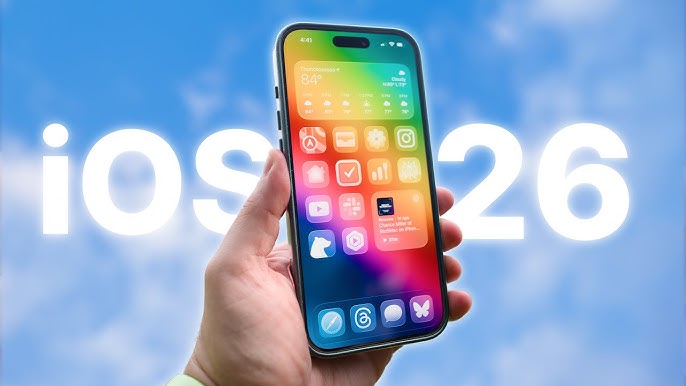
What’s New in iOS 26 – The Glass Look Design
The most talked-about change is the Liquid Glass design. Menus and buttons now have a shiny, transparent finish that looks like frosted glass. At first, it feels premium and futuristic. But during real use, text readability can sometimes take a hit.
Apple has been refining this design since the beta phase, and it’s likely we’ll see more adjustments in the coming months.
👉 User take: On my iPhone, the Glass look feels beautiful when browsing Photos or using Music. But in bright outdoor light, it sometimes makes menus harder to read.
The Camera app also benefits from this simplified design. Only Photo and Video are upfront, while the rest (like Portrait or Slo-Mo) appear with simple swipes. It feels cleaner and easier to use without unnecessary clutter.
iOS 26 New Features You’ll Actually Use
Apple didn’t just focus on looks, now it brings plenty of practical features:
- Phone app & Call Assist: A redesigned card layout plus call screening. When an unknown number calls, the system asks for their name and reason before your phone rings. Spam calls are now much easier to filter.
- Messages app: Polls, chat backgrounds, typing indicators, and improved spam filtering. Apple is finally catching up with WhatsApp and Telegram.
- Games & Preview app: The new Games hub organizes what you play, while the Preview app (long loved on Mac) comes to iOS, making PDFs easier to edit and sign.
- Apple Music: Auto-mixing between tracks, lyrics translation, and the option to pin favorite playlists.
- Maps: Lets you set preferred routes and notifies you if there’s traffic or an accident.
- Other useful touches:
- Custom snooze times for alarms.
- Digital ID in Wallet for airports and TSA checks.
- Smarter reminders that detect grocery lists from recipes.
- Voice recording with input source control (great for podcasters).
- Accessibility nutrition labels on App Store apps.
👉 Friend’s take: “On macOS Tahoe, the update feels subtle but smooth, no flashy redesign, just faster performance. Meanwhile, iOS feels more experimental with the Glass look.”
A Softer Touch of Intelligence
Apple kept AI subtle this year. Built-in translation now works inside Messages, FaceTime, and Phone in multiple languages including English, French, German, Portuguese, and Spanish. AirPods also support live translation, which is incredibly handy when traveling.
There’s also screen awareness. Press Power + Volume Down and you’ll see options to add events or search based on what’s on screen. The shortcut is useful, though the overlap with the screenshot button makes it slightly confusing.
macOS Tahoe and iPadOS 26: Side by Side with iOS
While iOS 26 brings big visual changes, macOS Tahoe focuses on stability. It’s faster and feels polished, especially on newer Apple Silicon Macs.
On the iPad, iPadOS 26 is a game changer. Multitasking finally works smoothly, letting you run apps side by side without slowdown. For me, this makes the iPad far more practical for real work, not just media.
Potential Issues After Updating
Not everything is perfect in iOS 26:
- The Glass look can reduce readability in certain lighting.
- Some features, like screen intelligence, still feel unpolished.
- Battery life seems slightly reduced after the update (my own experience after 3 days).
- App compatibility: a few third-party apps haven’t yet optimized for iOS 26, which may cause small glitches.
If you rely heavily on older apps, it might be wise to wait a couple of weeks until developers catch up.
Final Thoughts: Should You Update to iOS 26 Now?
Apple jumped from iOS 18 straight to iOS 26 to align version numbers across platforms and match the year. The update feels bold: a futuristic Glass look, smarter call screening, better multitasking, and a ton of smaller quality-of-life features.
That said, iOS 26 isn’t perfect. The new design looks stunning but occasionally hurts usability. Some features need refining. On iPad and Mac, the update feels smoother and more balanced. On iPhone, it’s exciting but may take some adjusting.
👉 If you like being first to try new things, update now. If you prefer stability, wait a few weeks for Apple to roll out bug fixes.
FAQ
1. Should I update to Apple iPhone iOS 26 right now?
Yes, if you have iPhone 11, iPhone SE 2, or newer. You’ll get the new Glass look, better call screening, and smoother features. Just know some parts still need refining.
2. What are the best iOS 26 new features?
Call screening, polls in Messages, the Preview app for PDFs, custom snooze alarms, and live translation on AirPods.
3. Is iOS 26 better on iPad or iPhone?
On iPad, multitasking finally feels natural. On iPhone, the Glass look is fresh but takes time to adjust.
4. What is macOS Tahoe and how does it compare to iOS 26?
macOS Tahoe is the new Mac update. It focuses on speed and stability, while iOS 26 pushes design changes and experimental features.
5. How do I update to iOS 26 on my iPhone?
Go to Settings > General > Software Update and download the latest version. The file size may vary depending on your device, but expect around 5GB.


Leave a reply to Apple iPhone 17 Review Should You Upgrade Now – safa.tech Cancel reply